
ICT Kill Zones Indicator MT4/MT5 FREE Download – Powerful & Proven Trading Tool for Smart Entries


What Is the ICT Kill Zones Indicator?
The ICT Kill Zones Indicator is a session-based trading tool that highlights specific time windows during the trading day when market volatility and institutional activity are highest.
The strategy was developed by Michael Huddleston, also known as ICT (Inner Circle Trader). His method focuses on institutional order flow, liquidity, and market manipulation patterns.
Instead of trading randomly throughout the day, ICT teaches traders to focus only on high-probability time windows—called “Kill Zones.”
Origins of the ICT Trading Concept
ICT trading is based on the idea that large financial institutions move markets. These institutions operate during specific hours, especially during major session overlaps. Retail traders who align with these windows often experience stronger price moves and clearer setups.
Why Kill Zones Matter in Forex
Here’s why they’re powerful:
- Higher liquidity
- Stronger price momentum
- Clearer breakouts
- Institutional participation
- Better risk-to-reward opportunities
In short? You trade when the market is awake—not sleepy.
Key Trading Sessions Highlighted by the Indicator
The indicator visually marks major Forex session windows on your chart.
Asian Session Kill Zone

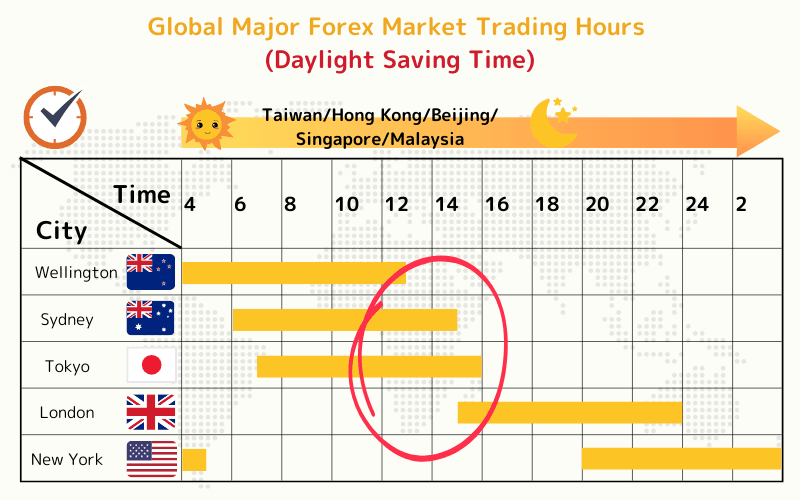

4
- Typically low volatility
- Often forms daily range
- Good for range-based setups
London Kill Zone
This is where things get exciting.
- High volatility
- Strong breakouts
- Liquidity grabs
- Major trend formation
Many ICT traders focus heavily on this session.
New York Kill Zone
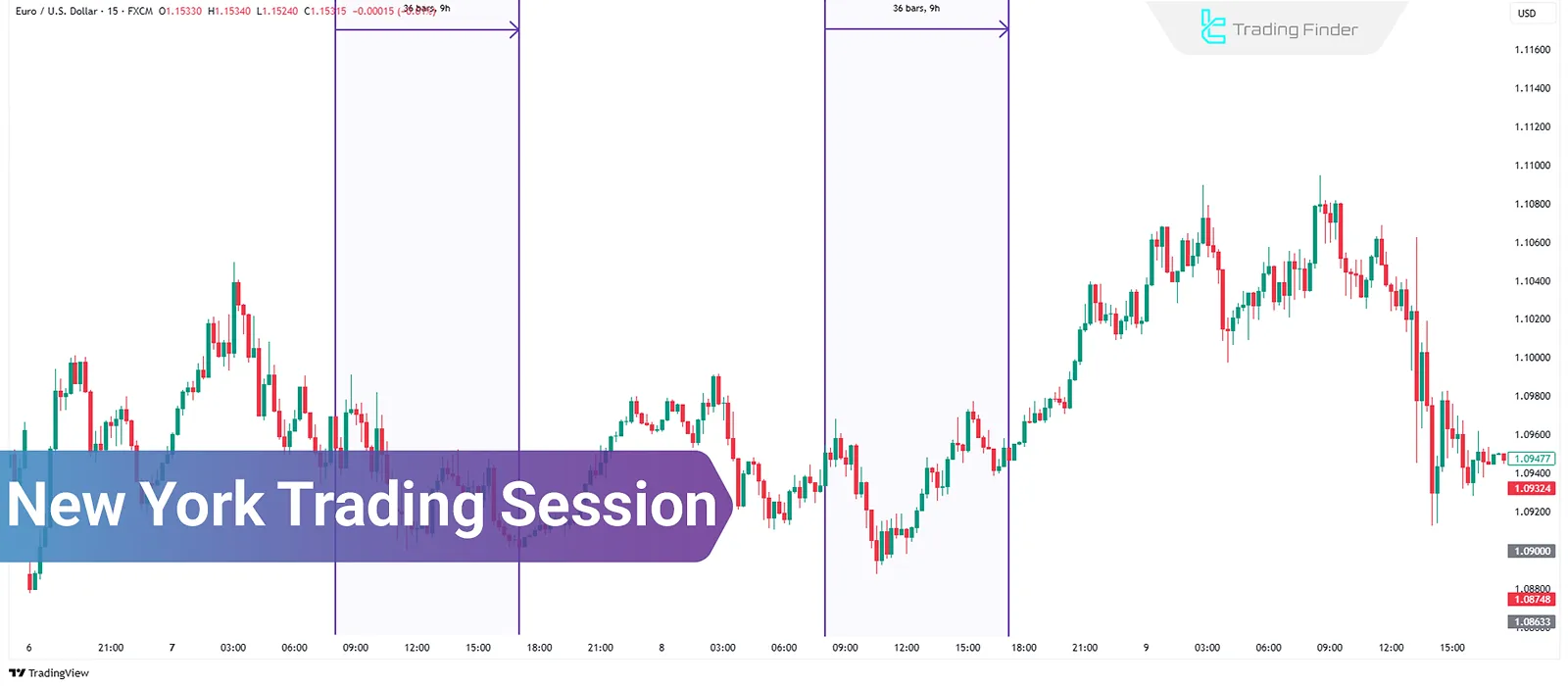


4
- Overlaps with London session
- Strong continuation moves
- Ideal for reversals and manipulation setups
London Close Kill Zone
- Often retraces earlier moves
- Provides short-term scalping opportunities
How ICT Kill Zones Indicator Works on MT4 and MT5
The indicator operates smoothly on both:
- MetaTrader 4
- MetaTrader 5
Visual Time Box Overlays
It draws colored boxes on your chart representing session windows. No guesswork needed.

Automatic Time Conversion
One major advantage? It automatically adjusts to your broker’s server time.
Customizable Session Settings
You can:
- Change session times
- Modify colors
- Adjust transparency
- Enable alerts
That flexibility makes it suitable for beginners and advanced traders alike.
ICT Kill Zones Indicator MT4/MT5 FREE Download – Installation Guide
Before downloading, always ensure you get it from a reputable trading community or trusted Forex forum. Avoid suspicious links.
For educational resources, you can explore official platform documentation at:
https://www.metatrader4.com/
How to Install on MT4
- Download the .ex4 or .mq4 file
- Open MT4
- Click File → Open Data Folder
- Go to MQL4 → Indicators
- Paste the file
- Restart MT4
- Drag indicator onto chart
Done!
How to Install on MT5
- Download .ex5 file
- Open MT5
- File → Open Data Folder
- MQL5 → Indicators
- Paste file
- Restart platform
- Attach to chart
Simple and quick.
Best Trading Strategies Using ICT Kill Zones
The indicator alone doesn’t guarantee profit. You must combine it with structure and price action.
Liquidity Sweep Strategy
During London open:
- Price takes previous high/low
- Grabs liquidity
- Sharp reversal follows
This setup works beautifully inside kill zones.
Break and Retest Setup
- Market breaks Asian range
- Returns to retest breakout level
- Entry on confirmation
High-probability trade during London session.
Fair Value Gap Entries
ICT traders often wait for:
- Impulsive move
- Imbalance (fair value gap)
- Return into gap
- Entry during active kill zone
That timing is key.
Advantages and Limitations
Advantages
- Clear visual guidance
- Improves discipline
- Filters low-quality trades
- Works on all pairs
- Beginner-friendly
Limitations
- Doesn’t predict direction
- Requires strategy confirmation
- Session times vary by broker
Remember, it’s a timing tool—not a signal generator.
Risk Management During Kill Zones
Volatility increases during kill zones. That’s good—but dangerous if unmanaged.
Follow these rules:
- Risk only 1–2% per trade
- Use stop-loss always
- Avoid overtrading
- Trade one session per day
More trades don’t mean more profits. Precision beats frequency.
Common Mistakes Traders Make
Here’s what to avoid:
- Trading all kill zones daily
- Ignoring market structure
- Overleveraging
- Blindly following boxes
- Not adjusting for daylight saving time
Discipline makes the difference.

Powerful Forex VPS for MT4 & MT5 – Best Price
In stock
$44.99 $359.99Price range: $44.99 through $359.99| Validity | Monthly, Quarterly, Semi Annually, Annually |
|---|
Frequently Asked Questions (FAQs)
1. Is ICT Kill Zones Indicator free?
Yes, many versions are available for free within trading communities and forums.
2. Does it work on all currency pairs?
Yes. However, it works best on major pairs like EUR/USD and GBP/USD.
3. Can beginners use this indicator?
Absolutely. It simplifies session tracking, making it beginner-friendly.
4. Does it repaint?
No. It only highlights time windows—it doesn’t change past data.
5. What timeframe works best?
Most ICT traders prefer M5, M15, or M30 charts.
6. Is it suitable for scalping?
Yes. Especially during London and New York sessions.
Conclusion – Is ICT Kill Zones Indicator MT4/MT5 FREE Download Worth It?
Without a doubt, the ICT Kill Zones Indicator MT4/MT5 FREE Download is a valuable addition to any Forex trader’s toolkit. It enhances timing, boosts discipline, and aligns you with institutional trading hours.
However, remember this: tools don’t create profits—skills do.
Use it with:
- Solid market structure analysis
- Liquidity concepts
- Proper risk management
- Emotional discipline
When combined correctly, this indicator can significantly improve your trading precision and confidence.


Most Popular Forex EA


Apex Quant BTCUSD EA: AI Bitcoin Scalper for MT5
In stock
$0.00 $159.99Price range: $0.00 through $159.99

AVA AIGPT5 XAUUSD EA: AI Gold Scalper for MT4
In stock
$0.00 $679.99Price range: $0.00 through $679.99

Elysium Vortex EURCAD EA: AI EURCAD Scalper for MT5
In stock
$0.00 $199.99Price range: $0.00 through $199.99
Equinox Cosmos GBPJPY EA: AI GBPJPY Scalper for MT5
In stock
$0.00 $399.99Price range: $0.00 through $399.99




Golden Deer Holy Grail Indicator (Lifetime Premium)
In stock
Original price was: $109.99.$87.99Current price is: $87.99.

Mythos Epic XAUUSD EA: AI Gold Scalper for MT5
In stock
$0.00 $849.99Price range: $0.00 through $849.99

Nexora Manus XAUUSD EA: AI Gold Scalper for MT5
In stock
$0.00 $699.99Price range: $0.00 through $699.99

Obsidian Aether EURUSD EA: AI Grid Scalper for MT5
In stock
$0.00 $797.99Price range: $0.00 through $797.99
Onix Stratos XAUUSD EA: AI Smart Scalper for MT5
In stock
$0.00 $999.99Price range: $0.00 through $999.99
Powerful Forex VPS for MT4 & MT5 – Best Price
In stock
$44.99 $359.99Price range: $44.99 through $359.99
 Gold Forex EA