
Auto Support & Resistance Indicator FREE Download: 7 Powerful Benefits Every Trader Must Know



Introduction to Auto Support & Resistance Indicator FREE Download
The Auto Support & Resistance Indicator FREE Download is a technical analysis tool that automatically identifies important price levels where the market tends to reverse or consolidate.
Instead of manually drawing horizontal lines and guessing where price might react, this indicator uses algorithms to detect:
- Swing highs and lows
- Historical price reactions
- Market structure
- Breakout zones
It saves time, improves consistency, and helps remove emotional bias from your trading decisions.
What Is Support and Resistance in Trading?
Before diving deeper, let’s simplify the basics.
Understanding Support Levels
Support is a price level where demand is strong enough to stop a price decline. Think of it as a “floor” that price struggles to break below.
When price hits support:
- Buyers enter the market
- Selling pressure slows down
- Price often bounces upward
Understanding Resistance Levels
Resistance is the opposite. It acts like a “ceiling” where selling pressure increases.
When price reaches resistance:
- Sellers step in
- Buying slows down
- Price often reverses downward
These levels form because traders remember past price reactions. Markets have memory—and smart traders use it.

Why Manual Drawing Isn’t Always Reliable
Drawing support and resistance manually sounds easy. But in reality:
- Traders draw different levels on the same chart
- Emotions influence placement
- Timeframes change perspective
- Market structure evolves
One trader’s resistance is another trader’s breakout.
An automated solution reduces subjectivity and ensures consistency across timeframes.
How an Auto Support & Resistance Indicator Works
Algorithm-Based Level Detection
Modern indicators scan historical data using mathematical logic. They identify:
- Repeated swing highs and lows
- Consolidation areas
- Volume clusters
- Price rejection zones
Instead of guessing, the indicator uses defined rules.
Dynamic Price Adjustment
Markets move constantly. Good indicators adjust levels dynamically as new price data forms.


4
Notice how price reacts multiple times around similar zones. That’s what automated detection captures efficiently.
Key Features of a Quality Indicator
Not all tools are equal. Here’s what to look for.
Multi-Timeframe Analysis
A strong indicator allows you to view levels from:
- 1-hour charts
- 4-hour charts
- Daily charts
Higher timeframe levels are typically stronger and more reliable.
Custom Alerts and Notifications
Advanced versions send alerts when:
- Price touches support
- Resistance breaks
- Fake breakouts occur
This saves you from staring at charts all day.
Breakout Detection
Breakouts are powerful trading opportunities. When price closes above resistance or below support, momentum often follows.
A good indicator highlights these zones clearly.
Benefits of Using Auto Support & Resistance Indicator FREE Download
Let’s talk advantages.

- Saves Time – No more manual drawing
- Improves Accuracy – Based on objective data
- Removes Emotional Bias
- Enhances Entry Timing
- Improves Risk-Reward Ratio
- Works Across Forex, Stocks, and Crypto
- Perfect for Beginners and Experts
Most importantly, it creates structure in chaotic markets.
Best Platforms to Install the Indicator
Different traders use different platforms. Here are the most common ones:
MetaTrader 4
- Popular among forex traders
- Supports custom indicators (.ex4 files)
- Lightweight and beginner-friendly
MetaTrader 5
- More advanced than MT4
- Better for stocks and futures
- Enhanced backtesting features
TradingView
- Web-based
- Pine Script support
- Social trading community
You can visit https://bestmt4ea.com/ https://www.tradingview.com/?aff_id=122391 to explore available scripts.
How to Install the Indicator (Step-by-Step Guide)
For MetaTrader 4 or 5:
- Download the indicator file (.ex4 or .ex5)
- Open your platform
- Click “File” → “Open Data Folder”
- Navigate to “MQL4” or “MQL5” → “Indicators”
- Paste the file
- Restart the platform
- Drag the indicator onto your chart
For TradingView:
- Go to Indicators
- Search for “Support and Resistance”
- Add the script to your chart
That’s it. Simple and quick.
Real-World Trading Example
Imagine EUR/USD approaching a resistance level identified by the indicator.
Scenario:
- Price touches resistance
- RSI shows overbought
- Bearish candle forms
This creates a strong confluence setup.
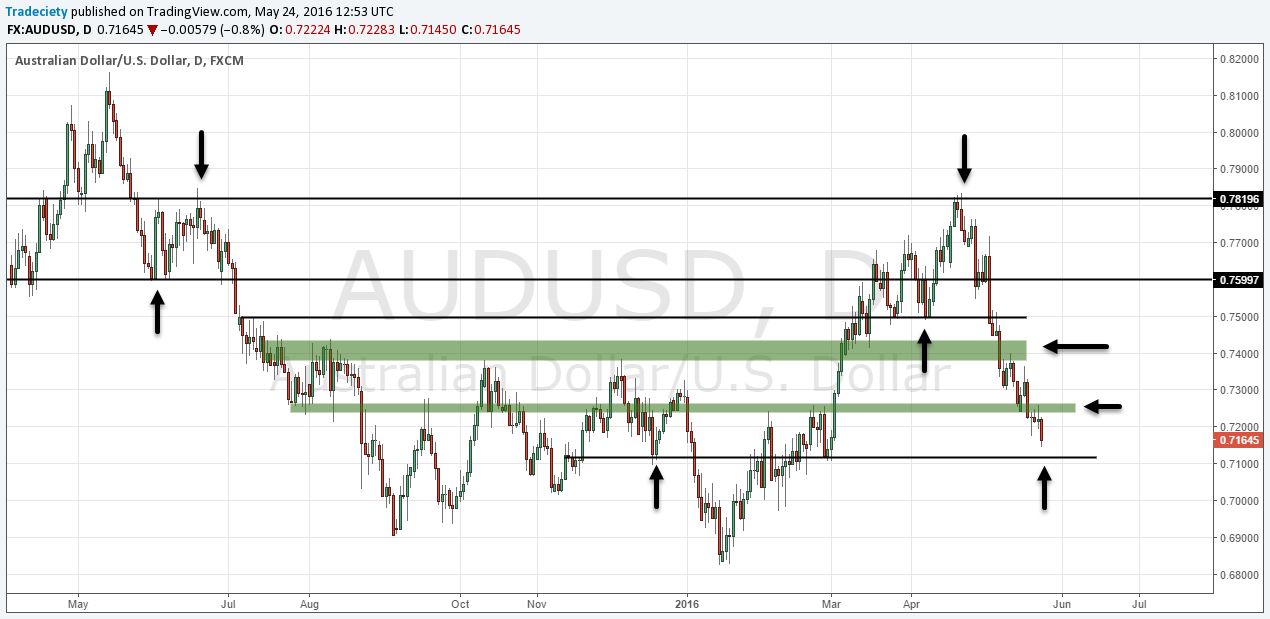
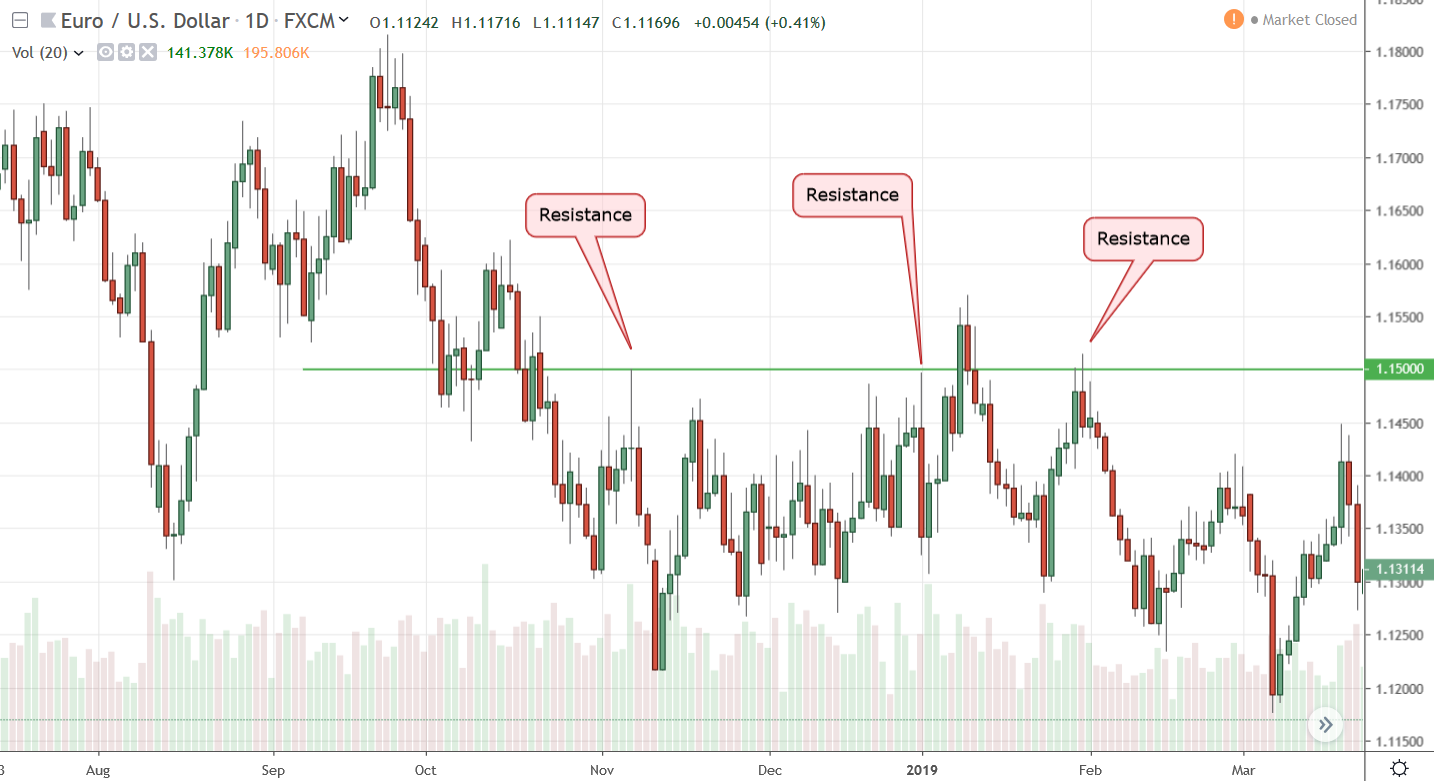
4
You could enter a short trade with:
- Stop loss above resistance
- Target at next support
Structured. Logical. Strategic.
Common Mistakes to Avoid
Even with automation, traders make errors:
- Trading every level blindly
- Ignoring trend direction
- Using only one timeframe
- Not confirming with other indicators
Remember, support and resistance are zones—not exact lines.
Advanced Trading Strategies Using Support & Resistance
Want to level up?
Try these:
1. Break and Retest Strategy
Wait for breakout → Wait for pullback → Enter confirmation.
2. Range Trading Strategy
Buy near support → Sell near resistance → Tight stop loss.
3. Trend Continuation Strategy
Use support in uptrend and resistance in downtrend for entries.

Risk Management and Trade Confirmation
No indicator guarantees profits.
Always:
- Risk only 1–2% per trade
- Use stop losses
- Confirm with trend analysis
- Combine with volume or RSI
Trading is a probability game—not a certainty business.
FAQs
1. Is Auto Support & Resistance Indicator FREE Download really free?
Yes, many versions are available for free on trading forums and platforms. However, premium versions may offer additional features.
2. Does it repaint?
Some indicators repaint past levels. Always test on a demo account first.
3. Can beginners use it?
Absolutely. It simplifies chart reading and removes confusion.
4. Does it work for crypto trading?
Yes. Support and resistance apply to forex, stocks, indices, and crypto markets.
5. What timeframe works best?
Higher timeframes (4H and Daily) typically provide stronger levels.
6. Should I rely only on this indicator?
No. Always combine it with other tools like trend analysis and risk management.
Conclusion
The Auto Support & Resistance Indicator FREE Download is a powerful tool that brings clarity and structure to your trading strategy. Instead of guessing key price levels, you let technology handle the heavy lifting.
It saves time.
It reduces emotional bias.
It improves precision.
But remember—no indicator replaces discipline, patience, and sound risk management.
Use it wisely, test it thoroughly, and combine it with a solid trading plan. That’s how you turn a free tool into a powerful advantage.
Most Popular Forex EA

Onix Stratos XAUUSD EA: AI Smart Scalper for MT5
In stock
$0.00 $999.99Price range: $0.00 through $999.99
Elysium Vortex EURCAD EA: AI EURCAD Scalper for MT5
In stock
$0.00 $199.99Price range: $0.00 through $199.99
Equinox Cosmos GBPJPY EA: AI GBPJPY Scalper for MT5
In stock
$0.00 $399.99Price range: $0.00 through $399.99
Apex Quant BTCUSD EA: AI Bitcoin Scalper for MT5
In stock
$0.00 $159.99Price range: $0.00 through $159.99
Zenith Matrix XAUUSD EA: AI Gold Scalper for MT5
In stock
$0.00 $899.99Price range: $0.00 through $899.99
Nexora Manus XAUUSD EA: AI Gold Scalper for MT5
In stock
$0.00 $699.99Price range: $0.00 through $699.99
Mythos Epic XAUUSD EA: AI Gold Scalper for MT5
In stock
$0.00 $849.99Price range: $0.00 through $849.99
Obsidian Aether EURUSD EA: AI Grid Scalper for MT5
In stock
$0.00 $797.99Price range: $0.00 through $797.99
AVA AIGPT5 XAUUSD EA: AI Gold Scalper for MT4
In stock
$0.00 $679.99Price range: $0.00 through $679.99

Golden Deer Holy Grail Indicator (Lifetime Premium)
In stock
Original price was: $109.99.$87.99Current price is: $87.99.
Windows VPS for MT4 & MT5
In stock
$44.99 $359.99Price range: $44.99 through $359.99




 Gold Forex EA