
MTF WPR Forex Indicator MT4 Free Download: 7 Powerful Benefits & Complete Setup Guide



If you’re searching for MTF WPR Forex Indicator MT4 Free Download, you’re likely looking for a smarter way to analyze momentum across multiple timeframes in MetaTrader 4. Great news—you’re in the right place!
The Multi-Timeframe Williams Percent Range (MTF WPR) indicator is a powerful technical analysis tool that helps traders identify overbought and oversold market conditions across different timeframes—without constantly switching charts.
In this comprehensive guide, you’ll learn:
- What the MTF WPR indicator is
- How it works in MT4
- Its advantages and limitations
- Installation steps
- Real trading strategies
- FAQs and expert tips
Let’s dive in!
What Is the MTF WPR Forex Indicator?


4
The MTF WPR Forex Indicator MT4 Free Download refers to a customized version of the classic Williams Percent Range indicator that displays data from multiple timeframes on a single chart.
The original Williams %R was developed by Larry Williams. It measures momentum and identifies:
- Overbought levels
- Oversold levels
- Possible reversal zones
The MTF (Multi-Timeframe) version enhances this by allowing traders to view higher timeframe momentum while trading on a lower timeframe chart.

For example:
- Trading on M15
- Viewing H1 or H4 Williams %R values simultaneously
This adds powerful context to your entries.
How the Williams %R Indicator Works
The Williams Percent Range (%R) is a momentum oscillator that moves between:
- 0 (overbought)
- -100 (oversold)
Formula Overview
%R = (Highest High – Close) / (Highest High – Lowest Low) × -100
Key Levels
| Level | Meaning |
|---|---|
| 0 to -20 | Overbought zone |
| -80 to -100 | Oversold zone |
| -50 | Midline (trend bias shift) |
When price enters overbought or oversold territory, a reversal may be near—but confirmation is essential.
Why Use the MTF WPR Forex Indicator MT4 Free Download?
1. Multi-Timeframe Confirmation
Instead of switching between charts, the MTF WPR shows:
- Current timeframe %R
- Higher timeframe %R
This reduces false signals.
2. Better Trend Alignment
If:
- Lower timeframe = oversold
- Higher timeframe = bullish trend
You get stronger buy confirmation.
3. Cleaner Chart Analysis
One window, multiple insights.
4. Ideal for Scalpers & Day Traders
Particularly useful for:
- M5
- M15
- H1 trading setups
How to Install MTF WPR Indicator in MT4


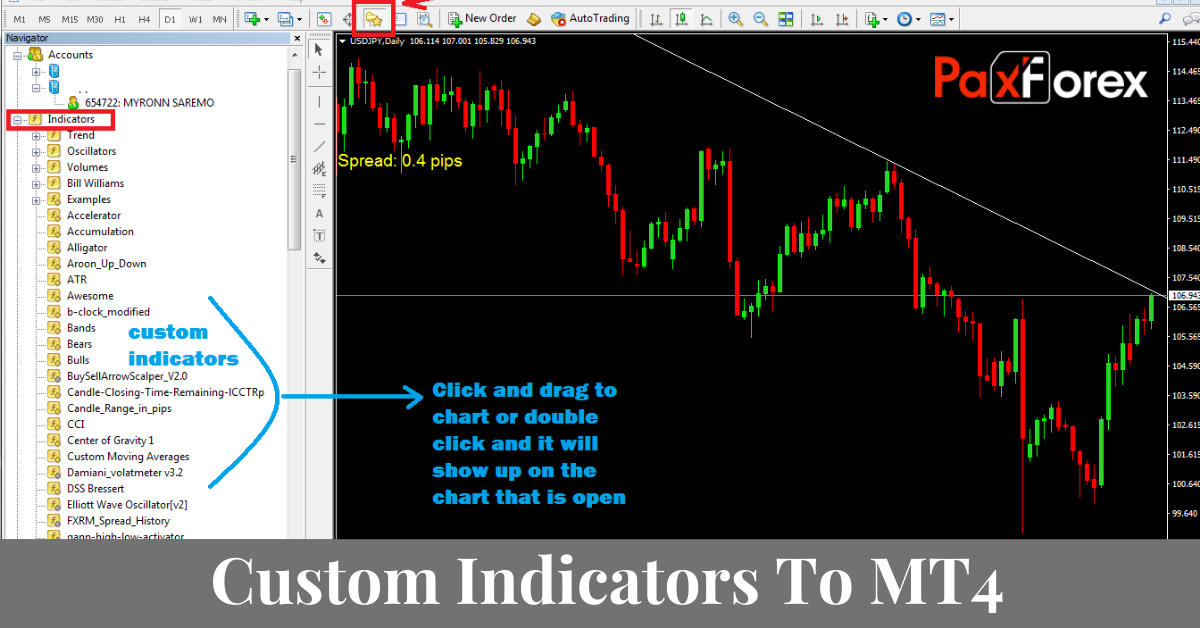
4
Follow these simple steps:
Step 1: Download the Indicator File
Search for MTF WPR Forex Indicator MT4 Free Download from a trusted Forex indicator resource.

Step 2: Open MT4 Data Folder
- Click File
- Select Open Data Folder
Step 3: Navigate to Indicators Folder
MQL4 → Indicators
Step 4: Paste the File
Copy the .ex4 or .mq4 file.
Step 5: Restart MT4
Or refresh the Navigator panel.
Step 6: Attach to Chart
Drag and drop the indicator from Navigator → Indicators.
Done!
Best Settings for MTF WPR
While default settings usually work well, here are recommended adjustments:
| Setting | Recommended Value |
|---|---|
| Period | 14 |
| Higher Timeframe | H1 or H4 |
| Overbought Level | -20 |
| Oversold Level | -80 |
You may adjust based on volatility and trading style.
Trading Strategy Using MTF WPR

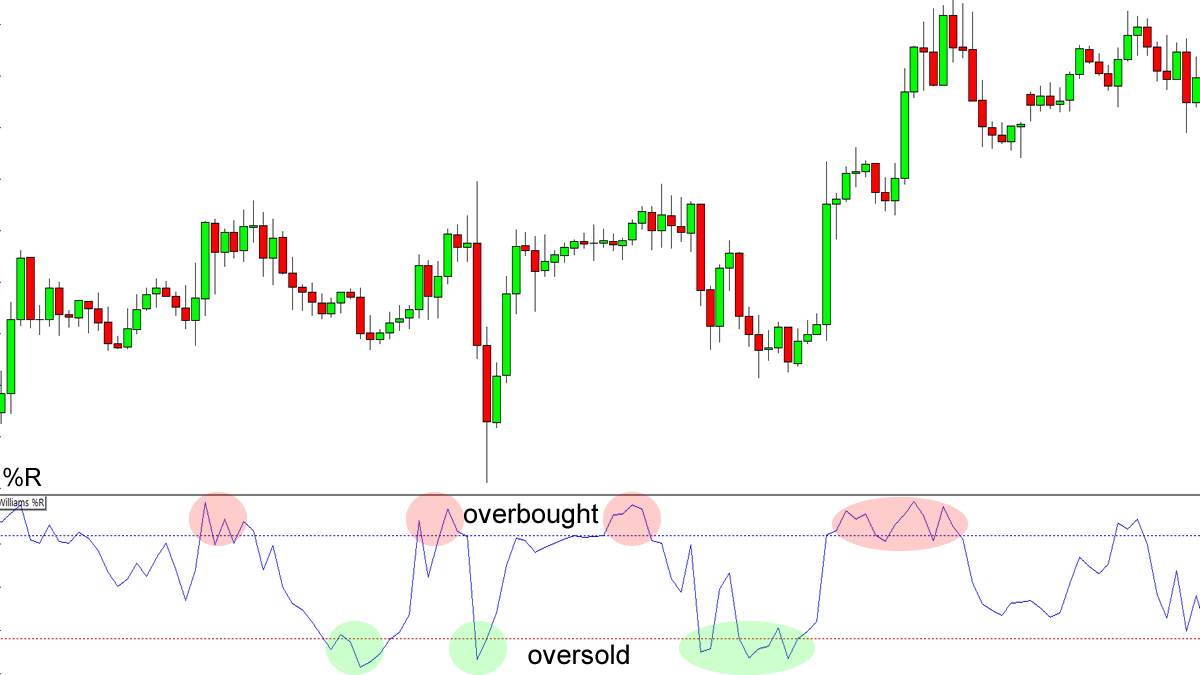
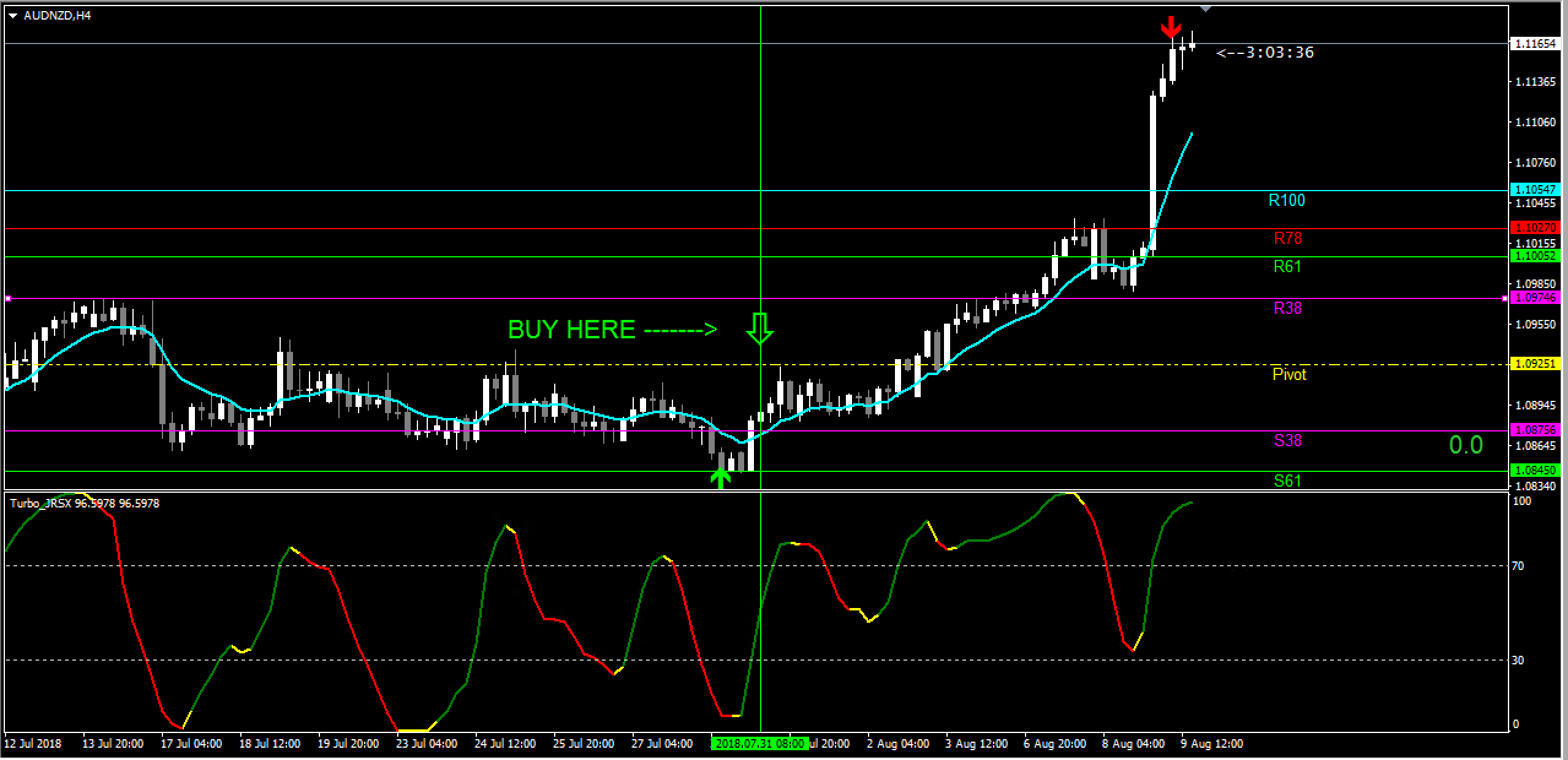
4
Strategy: Multi-Timeframe Reversal Confirmation
Buy Setup
- Higher timeframe WPR below -80
- Lower timeframe crosses above -80
- Price near support level
- Bullish candlestick confirmation
Sell Setup
- Higher timeframe WPR above -20
- Lower timeframe crosses below -20
- Price near resistance
- Bearish candle confirmation
Stop Loss & Take Profit
- SL below recent swing low (buy)
- SL above recent swing high (sell)
- TP at 1:2 risk-reward minimum
Advantages of MTF WPR Indicator
- Improves timing accuracy
- Reduces false breakouts
- Works on all currency pairs
- Compatible with MetaTrader 4
- Easy to customize
Limitations You Should Know
No indicator is perfect.
- Can give false signals in strong trends
- Works best with confirmation tools
- Not ideal as a standalone strategy
Combine with:
- Moving averages
- Support/resistance
- RSI or MACD
For reference on Williams %R theory, you can review Investopedia’s explanation here:
https://www.investopedia.com/terms/w/williamsr.asp
Who Should Use MTF WPR?
This indicator is ideal for:
- Scalpers
- Day traders
- Swing traders
- Multi-timeframe traders
- Beginners learning momentum trading
If you trade price reversals or pullbacks, this tool is extremely useful.
Tips to Maximize Accuracy
- Trade in the direction of higher timeframe trend
- Avoid trading during major news events
- Use risk management
- Backtest before going live
- Combine with market structure analysis
Common Mistakes to Avoid
- Taking every overbought/oversold signal
- Ignoring higher timeframe context
- Trading without confirmation
- Over-leveraging
Remember—discipline beats indicators every time!

Frequently Asked Questions (FAQs)
1. Is MTF WPR Forex Indicator MT4 Free Download really free?
Yes, many trading communities offer it free. Always download from trusted sources to avoid malware.
2. Can I use it on all currency pairs?
Yes. It works on:
- Major pairs
- Minor pairs
- Exotics
- Gold and indices
3. Does it repaint?
Most properly coded versions do not repaint. Always test in demo first.
4. What timeframe works best?
M15 + H1 combination is popular for day trading.
5. Is it good for beginners?
Yes! It’s simple to understand and visually clear.
6. Can I use it with other indicators?
Absolutely. It works well with:
- Moving averages
- RSI
- Price action setups
Conclusion: Is MTF WPR Worth Using?
If you’re serious about improving your timing and adding higher timeframe confirmation to your trades, the MTF WPR Forex Indicator MT4 Free Download is a smart addition to your MT4 toolbox.
It enhances the classic Williams %R by giving broader market perspective—without cluttering your charts.
However, remember:
✔ It’s a tool, not a magic solution
✔ Risk management is essential
✔ Always backtest before going live
Used correctly, this indicator can significantly improve your trading confidence and consistency.
Most Popular Forex EA

Onix Stratos XAUUSD EA: AI Smart Scalper for MT5
In stock
$0.00 $999.99Price range: $0.00 through $999.99
Elysium Vortex EURCAD EA: AI EURCAD Scalper for MT5
In stock
$0.00 $199.99Price range: $0.00 through $199.99
Equinox Cosmos GBPJPY EA: AI GBPJPY Scalper for MT5
In stock
$0.00 $399.99Price range: $0.00 through $399.99
Apex Quant BTCUSD EA: AI Bitcoin Scalper for MT5
In stock
$0.00 $159.99Price range: $0.00 through $159.99
Zenith Matrix XAUUSD EA: AI Gold Scalper for MT5
In stock
$0.00 $899.99Price range: $0.00 through $899.99
Nexora Manus XAUUSD EA: AI Gold Scalper for MT5
In stock
$0.00 $699.99Price range: $0.00 through $699.99
Mythos Epic XAUUSD EA: AI Gold Scalper for MT5
In stock
$0.00 $849.99Price range: $0.00 through $849.99
Obsidian Aether EURUSD EA: AI Grid Scalper for MT5
In stock
$0.00 $797.99Price range: $0.00 through $797.99
AVA AIGPT5 XAUUSD EA: AI Gold Scalper for MT4
In stock
$0.00 $679.99Price range: $0.00 through $679.99

Golden Deer Holy Grail Indicator (Lifetime Premium)
In stock
Original price was: $109.99.$87.99Current price is: $87.99.
Windows VPS for MT4 & MT5
In stock
$44.99 $359.99Price range: $44.99 through $359.99




 Gold Forex EA