
Wave Trend Oscillator Free Download: Powerful & Proven Guide with 5 Smart Trading Secrets





4
What Is Wave Trend Oscillator?
The Wave Trend Oscillator is a momentum-based technical indicator designed to identify overbought and oversold market conditions. It was popularized by trader LazyBear on TradingView and has since been widely adopted by forex and crypto traders.
Core Concept Behind the Indicator
At its core, the indicator measures price momentum and smooths it to filter out market noise. It combines exponential moving averages and channel index logic to create a smoother oscillator line.
The result? Clear signals when momentum shifts.
How It Differs from RSI and MACD
Unlike RSI, which can stay overbought for long periods during strong trends, Wave Trend often provides earlier reversal warnings.
Compared to MACD, it reacts faster to short-term market shifts. Many traders even combine it with MACD for confirmation.
Why Traders Search for Wave Trend Oscillator Free Download
There’s a good reason this indicator is in high demand.
Benefits for Forex Traders
- Identifies early trend reversals
- Works well in ranging markets
- Suitable for scalping and swing trading
Benefits for Crypto Traders
- Excellent for volatile markets
- Helps time entries during pullbacks
- Works across all timeframes
And the best part? You can get a Wave Trend Oscillator Free Download for most trading platforms without paying expensive subscription fees.

How Wave Trend Oscillator Works
Understanding how it works makes you a smarter trader.
Calculation Formula Explained Simply
The oscillator uses:
- Exponential Moving Averages (EMA)
- Price channel index
- Signal line smoothing
It plots two lines:
- Main Wave Trend line
- Signal line
When they cross, potential trade signals appear.
Overbought and Oversold Levels
Typical levels:
- +60 to +53 → Overbought
- -60 to -53 → Oversold
When price reaches these extremes, a reversal may be coming.
Signal Line Crossovers
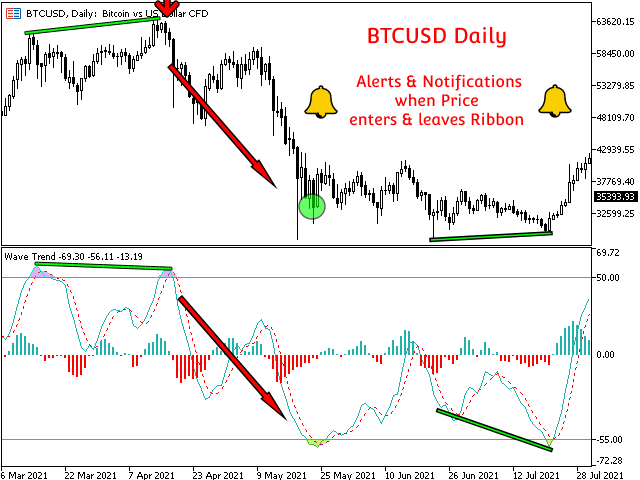
- Bullish Signal: Main line crosses above signal line in oversold zone
- Bearish Signal: Main line crosses below signal line in overbought zone
Simple. Clean. Effective.
Wave Trend Oscillator Free Download for MT4
Many traders want the indicator for MetaTrader 4.
Installation Step-by-Step
- Download the .mq4 file from a trusted source such as MQL5 marketplace
- Open MT4
- Click File → Open Data Folder
- Go to MQL4 → Indicators
- Paste the file
- Restart MT4
- Add it from Navigator → Indicators
You can find community versions on trusted platforms like https://www.mql5.com.
Wave Trend Oscillator for MT5
MT5 users follow almost identical steps.
Setup Guide
- Download .mq5 version
- Place it in MQL5 → Indicators
- Refresh platform
- Attach to chart
Done!
Wave Trend Oscillator on TradingView


4
If you’re using TradingView, you don’t even need a download.
How to Add It Instantly
- Open TradingView
- Click Indicators
- Search “WaveTrend”
- Choose the public script version
Most traders use the version created by LazyBear.

Best Settings for Different Markets
Default settings usually work fine, but customization helps.
Scalping Settings
- Channel Length: 9
- Average Length: 12
- Use 5–15 minute charts
Swing Trading Settings
- Channel Length: 10–14
- Average Length: 21
- Use 1H–4H charts
Test before going live.
5 Smart Trading Secrets Using Wave Trend Oscillator
Here’s where things get interesting.
Secret #1: Divergence Strategy
If price makes higher highs but Wave Trend makes lower highs, that’s bearish divergence.
Big warning sign.
Secret #2: Multi-Timeframe Confirmation
Check higher timeframe for trend direction before entering lower timeframe trade.
Improves accuracy dramatically.
Secret #3: Trend Filter Combination
Combine with 200 EMA.
Only take buy signals above EMA and sell signals below it.
Secret #4: Support & Resistance Confluence
Don’t trade blindly.
Wait for signals near key support or resistance zones.
Secret #5: Exit Timing Precision
Exit when opposite crossover appears in extreme zone.
Protects profits.
Common Mistakes to Avoid
- Using it alone without confirmation
- Ignoring higher timeframe trend
- Overtrading every crossover
- Not backtesting settings
Remember: Indicators guide. They don’t guarantee.

Risk Management Tips
- Risk only 1–2% per trade
- Always use stop-loss
- Don’t trade during major news
- Keep trading journal
Consistency beats excitement.
Frequently Asked Questions
1. Is Wave Trend Oscillator really free?
Yes. Many community versions are available for free on MT4, MT5, and TradingView.
2. Does it repaint?
Most standard versions do not repaint, but always test your version.
3. Is it good for beginners?
Yes, because signals are visual and easy to understand.
4. What timeframe works best?
It works on all timeframes, but 1H and 4H are most reliable.
5. Can I use it for crypto trading?
Absolutely. It performs very well in volatile markets.
6. Is Wave Trend better than RSI?
It depends on strategy. Many traders prefer combining both.
Final Thoughts
Getting a Wave Trend Oscillator Free Download is easy. But mastering it? That takes practice, discipline, and proper risk management.
Used correctly, this indicator can become one of your most powerful tools for spotting reversals, timing entries, and maximizing profits.
Start by testing it on a demo account. Adjust settings. Combine with trend filters. And always protect your capital.
Trading isn’t about being right every time. It’s about being smart over time.
Most Popular Forex EA

Onix Stratos XAUUSD EA: AI Smart Scalper for MT5
In stock
$0.00 $999.99Price range: $0.00 through $999.99
Elysium Vortex EURCAD EA: AI EURCAD Scalper for MT5
In stock
$0.00 $199.99Price range: $0.00 through $199.99
Equinox Cosmos GBPJPY EA: AI GBPJPY Scalper for MT5
In stock
$0.00 $399.99Price range: $0.00 through $399.99
Apex Quant BTCUSD EA: AI Bitcoin Scalper for MT5
In stock
$0.00 $159.99Price range: $0.00 through $159.99
Zenith Matrix XAUUSD EA: AI Gold Scalper for MT5
In stock
$0.00 $899.99Price range: $0.00 through $899.99
Nexora Manus XAUUSD EA: AI Gold Scalper for MT5
In stock
$0.00 $699.99Price range: $0.00 through $699.99
Mythos Epic XAUUSD EA: AI Gold Scalper for MT5
In stock
$0.00 $849.99Price range: $0.00 through $849.99
Obsidian Aether EURUSD EA: AI Grid Scalper for MT5
In stock
$0.00 $797.99Price range: $0.00 through $797.99
AVA AIGPT5 XAUUSD EA: AI Gold Scalper for MT4
In stock
$0.00 $679.99Price range: $0.00 through $679.99

Golden Deer Holy Grail Indicator (Lifetime Premium)
In stock
Original price was: $109.99.$87.99Current price is: $87.99.
Windows VPS for MT4 & MT5
In stock
$44.99 $359.99Price range: $44.99 through $359.99




 Gold Forex EA