
📊 i-Session Forex Indicator – Powerful & Free Trading Tool Guide





4
If you’re searching for i-Session Forex Indicator Free Download, you’re likely looking for a smart way to track trading sessions directly on your MetaTrader chart. Good news — you’re in the right place.
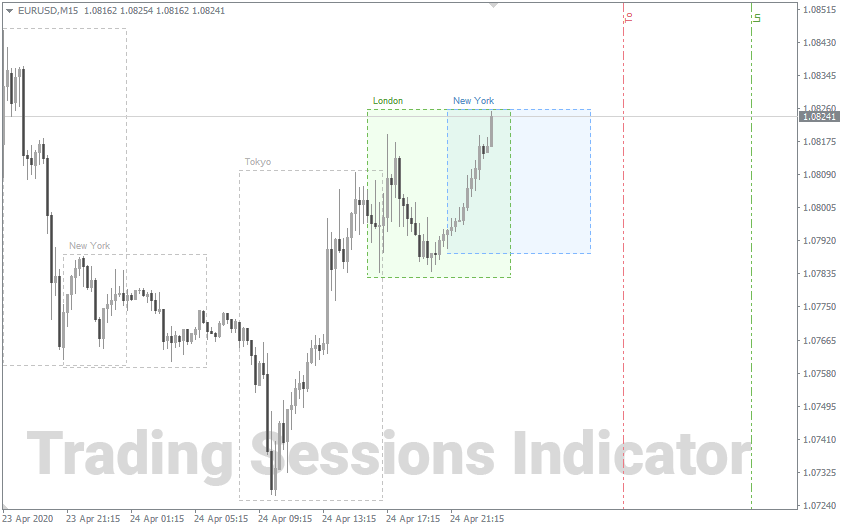
The i-Session Forex Indicator is a popular MT4 tool that highlights major forex market sessions such as:
- London Session
- New York Session
- Tokyo Session
- Sydney Session
It visually draws boxes on your chart to show session high and low ranges, helping traders identify breakouts, volatility spikes, and trend continuation setups.
In this guide, you’ll learn:
- What the i-Session Forex Indicator is
- How it works
- Its key features
- How to install it
- Pros and cons
- Trading strategies using session boxes
- FAQs
- Safe download tips
Let’s dive in.
🧭 What Is the i-Session Forex Indicator?
The i-Session Forex Indicator is a custom technical indicator designed mainly for MetaTrader 4 (MT4). It automatically marks trading sessions on your chart by drawing rectangular zones showing:

- Session open
- Session close
- Session high
- Session low
Instead of manually calculating session ranges, this tool does it instantly.
Forex is a 24-hour market, but not all hours are equal. Volatility varies depending on global market participation. The most active sessions include:
- London (most volatile)
- New York
- Tokyo
By using the i-Session indicator, traders can quickly identify:
- Breakout opportunities
- Range trading setups
- Session overlaps (high momentum periods)
- Institutional liquidity zones
⚙️ How Does the i-Session Forex Indicator Work?
The indicator works by using time-based calculations.
🔹 Step 1: Session Time Detection
It reads your broker’s server time and aligns session periods based on predefined time settings.
🔹 Step 2: Drawing the Box
Once a session begins:
- A box starts forming
- It expands as price moves
- It locks once the session closes
🔹 Step 3: Highlighting High & Low
The indicator calculates:
- Highest price during session
- Lowest price during session
This helps traders identify breakout levels for the next session.
🚀 Key Features of the i-Session Forex Indicator
Here are the standout features that make this indicator popular:
✔ Automatic Session Highlighting
No need to manually draw session lines.
✔ Customizable Time Settings
You can adjust session times based on your broker.
✔ Color Customization
Each session can have a different color.

✔ Lightweight & Fast
Doesn’t slow down MT4.
✔ Multi-Timeframe Compatibility
Works on M1 to Daily charts.
📈 Why Traders Use i-Session Forex Indicator
Professional traders understand that volatility clusters around session opens and overlaps.
🔥 London Breakout Strategy
One of the most popular strategies involves:
- Marking the Asian session range
- Waiting for London open
- Trading breakout of Asian high or low
The i-Session indicator makes this extremely easy.
💡 New York Reversal Setup
Sometimes, after London trends strongly, New York opens and reverses the move. Session boxes help spot exhaustion zones.
🛠 How to Install i-Session Forex Indicator (MT4)
Follow these steps:
- Download the indicator file (.mq4 or .ex4)
- Open MetaTrader 4
- Click File → Open Data Folder
- Navigate to MQL4 → Indicators
- Paste the file
- Restart MT4
- Drag the indicator onto your chart
That’s it.
📥 i-Session Forex Indicator Free Download – Is It Safe?
When looking for i-Session Forex Indicator Free Download, always:
- Avoid suspicious websites
- Scan files for viruses
- Use reputable trading forums
- Verify file format (.mq4 or .ex4 only)
Many forex communities offer it free since it’s widely distributed.
📊 Best Timeframes to Use
| Trading Style | Recommended Timeframe |
|---|---|
| Scalping | M5 – M15 |
| Day Trading | M15 – H1 |
| Swing Trading | H1 – H4 |
⚖️ Pros and Cons
✅ Pros
- Easy to use
- Improves session-based trading
- Great for breakout traders
- Free
❌ Cons
- Requires time adjustment for broker
- Not useful for fundamental-only traders
- Doesn’t predict direction
🎯 Trading Strategy Using i-Session Indicator
Strategy: Asian Range Breakout
- Let Tokyo session finish
- Mark high & low (automatically shown)
- Wait for London open
- Enter on breakout with stop below opposite range
- Target 1.5x range size
This strategy works best during high-volatility pairs like:

- EUR/USD
- GBP/USD
- XAU/USD
❓ Frequently Asked Questions (FAQs)
1️⃣ Is i-Session Forex Indicator really free?
Yes, it is commonly available for free in forex communities.
2️⃣ Does it work on MT5?
Most versions are built for MT4. MT5 requires a converted version.
3️⃣ Can beginners use it?
Absolutely. It’s beginner-friendly.
4️⃣ Does it repaint?
No. It only draws completed session data.
5️⃣ Is it better than manual session drawing?
Yes, because it saves time and reduces errors.
6️⃣ Can I use it for crypto trading?
Only if your platform supports session-based time zones.
🏁 Final Thoughts
The i-Session Forex Indicator Free Download is an excellent tool for traders who rely on session volatility and breakout strategies. It simplifies market timing and improves visual clarity.
However, remember:
👉 Indicators are tools — not magic solutions.
👉 Combine with risk management and price action.
👉 Always test on demo before going live.
If you trade session breakouts or intraday momentum, this indicator is definitely worth adding to your toolkit.
Most Popular Forex EA

Onix Stratos XAUUSD EA: AI Smart Scalper for MT5
In stock
$0.00 $999.99Price range: $0.00 through $999.99
Elysium Vortex EURCAD EA: AI EURCAD Scalper for MT5
In stock
$0.00 $199.99Price range: $0.00 through $199.99
Equinox Cosmos GBPJPY EA: AI GBPJPY Scalper for MT5
In stock
$0.00 $399.99Price range: $0.00 through $399.99
Apex Quant BTCUSD EA: AI Bitcoin Scalper for MT5
In stock
$0.00 $159.99Price range: $0.00 through $159.99
Zenith Matrix XAUUSD EA: AI Gold Scalper for MT5
In stock
$0.00 $899.99Price range: $0.00 through $899.99
Nexora Manus XAUUSD EA: AI Gold Scalper for MT5
In stock
$0.00 $699.99Price range: $0.00 through $699.99
Mythos Epic XAUUSD EA: AI Gold Scalper for MT5
In stock
$0.00 $849.99Price range: $0.00 through $849.99
Obsidian Aether EURUSD EA: AI Grid Scalper for MT5
In stock
$0.00 $797.99Price range: $0.00 through $797.99
AVA AIGPT5 XAUUSD EA: AI Gold Scalper for MT4
In stock
$0.00 $679.99Price range: $0.00 through $679.99

Golden Deer Holy Grail Indicator (Lifetime Premium)
In stock
Original price was: $109.99.$87.99Current price is: $87.99.
Windows VPS for MT4 & MT5
In stock
$44.99 $359.99Price range: $44.99 through $359.99




 Gold Forex EA